Skip to content
CONTACT SALESSTART BUILDING
‹ Back to blog

AI

AI Shell: Convert Natural Language Into Shell Commands
April 6, 2023

Written By Steve Sewell

Are you ever in your terminal and can't remember the syntax for something you need?

Well, now we can use AI to help.

Introducing AI Shell

With our latest project, AI Shell, you can just type what you want in plain English and generate a shell command with a human readable explanation of it.

For example: ai what is my IP address?

You will then get a generated shell command and a human readable explanation like below:

◇  Your script:
│
│  curl ifconfig.me
│
◇  Explanation:
│
│  1. Send a request to ifconfig.me using the "curl" command.
│  2. Receive and display the response from ifconfig.me.
│  3. End the script.
│
◆  Run this script?
│  ● ✅ Yes (Lets go!)
│  ○ 📝 Revise
│  ○ ❌ Cancel
└

You will then have the options to run the command, revise it (give a prompt explaining in plain English how you’d like to modify the command), or cancel.

This can be useful for a wide variety of tasks, from modifying your filesystem, to working with git.

For instance, we can have AI help us remember how to recursively create a directory with ai make a new file at ./foo/bar/bax.txt

Here it will remind me that it’s the -p flag that I always forget I need.

◇  Your script:
│
│  mkdir -p ./foo/bar && touch ./foo/bar/baz.txt
│
◇  Explanation:
│
│  1. Makes a directory named "foo" within the current directory.
│  2. Makes a directory named "bar" within the "foo" directory.
│  3. Creates an empty file named "baz.txt" within the "bar" directory.

We can even revise the commands too.

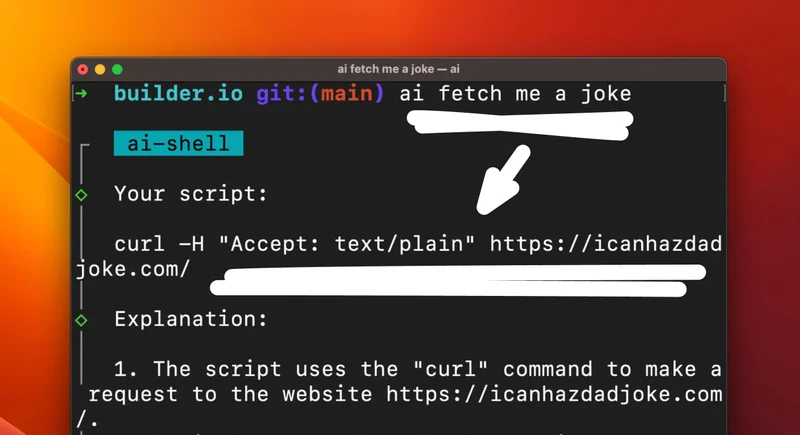
For instance, we can run ai fetch me a joke but then choose revise and ask for changes, like to specify that it’s a Chuck Norris joke that we want instead:

◇  Your script:
│
│  curl -s https://api.chucknorris.io/jokes/random | jq -r '.value'
│
◇  Explanation:
│
│  1. Sends a HTTP request to https://api.chucknorris.io/jokes/random
│  2. Retrieves the response from the URL
│  3. Uses the tool "jq" to extract the "value" field from the JSON response
│  4. Prints the extracted value to the console in plain text format.

This project was inspired by the Github Copilot CLI.

I have been so eager to get access, and eventually just got impatient and built my own.

In short, anything you can do with ChatGPT you can easily do with OpenAI’s chat completion API.

The process is extremely simple. First, create an account with OpenAI and grab an API key.

Then, in any node.js project, you can install their Node.js library with:

npm install openai

Now you can generate prompts and get responses.

import { OpenAIApi, Configuration } from 'openai';

const openAi = new OpenAIApi(new Configuration({ apiKey: YOUR_KEY }));

async function getCompletion(prompt: string) {
  const completion = await openAi.createChatCompletion({
    model: 'gpt-3.5-turbo',
    messages: [{ role: 'user', content: prompt }],
  });
  return completion.data.choices[0].message.content;
}

And that’s literally it. You can now send anything to ChatGPT over an API call, and get a reply, like:

const scriptPrompt = 'Give me the current time'

const reply = await getCompletion(`
  I will give you a prompt to create a single line bash command that one can enter in a terminal and run, based on what is asked in the prompt.

  The prompt: ${scriptPompt}
`)

console.log(reply) // 'date +"%T"'

With just that, you can transform a natural language ask into a bash prompt, and that’s precisely what we do in the source code to AI Shell.

Pretty cool right?

Imagine all the apps and tools you can build with such a simple yet powerful API…

Hi! I’m Steve, CEO of Builder.io. I built all of these AI features for us that you see above, so if you think it’s cool and want to follow other interesting stuff we make and write about, you may enjoy our newsletter.

Build in Claude Code.

Ship as a team in Builder.

Builder 2.0 lets you push your branch and hand off design review, PM feedback, and QA to the rest of your team
Try for free

Announcing Builder 2.0:

Multiplayer coding

Real-time collaboration, parallel agents, and visual editing. The whole team ships real code with Al now.

Try for free
Continue Reading
AI10 MIN
Developer experience is dead. Long live agent experience.
WRITTEN BYAlice Moore
June 8, 2026
AI4 MIN
How POGR Cut $30K and a Year of UI Work with Builder
WRITTEN BYAmy Cross
June 4, 2026
AI8 MIN
5 Questions to Ask Before Implementing an Agentic Development Platform
WRITTEN BYAmy Cross
May 28, 2026