Last Updated: March 2026
There’s a problem with today’s AI development tools. Vibe coding platforms are impressive and fun, but net-new code is useless when you already have a production codebase. Meanwhile, AI IDEs are powerful and interface with existing code, but they’re complex and developer-only.
Builder fills this gap. It's not another AI coding toy—it's an enterprise-grade agentic harness and visual canvas that plugs into your existing apps. It understands your code, respects your design decisions, and your whole team can use it, not just devs.
Ready to connect your existing React and MUI codebase to an AI that actually understands it? Start building with Builder for free →
Builder: The AI-powered visual canvas
Builder is Git-backed, AI-powered, visually responsive, and capable of Figma-like design edits.
Connect existing React and Material UI repos
Connect any GitHub repo, including monorepo and multi-repo setups. Builder works from fresh branches (never Main), offers preview URLs, and creates AI-generated PRs.
Once your project loads, try writing a prompt like, "make the hero image full-width,” or "add a Users dashboard at the /users route.”
Use Material UI and your custom components
Builder adheres to your specific design systems and component libraries. Need all your code pinned to MUI v6? Should every new button use your team's custom <Button/>? Builder intelligently finds and matches your design system patterns.
Wire up all your APIs
Connecting APIs is easy with Builder. Its no-code nature empowers the non-developers on your team to build sophisticated solutions, too. Try a prompt like, “Fetch customer data from Supabase and render it as MUI grid."
Edit React components visually with pixel-perfect precision
Leverage our rich Figma to React integration
Builder speaks fluent Figma. It can turn individual frames into components, merge multiple frames into complex layouts, or reference designs against existing elements. Builder also maps Figma components to their equivalent Material UI components, saving your devs hours of toil.
Drag and drop anything for extra context
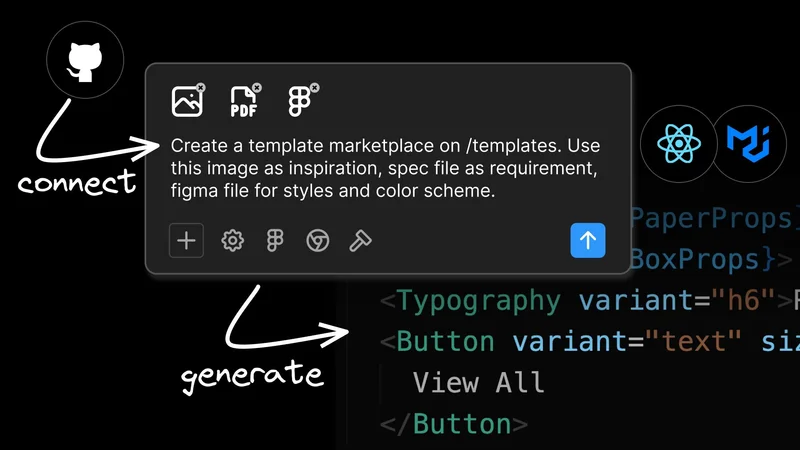
Drop in files for extra context—documents, PDFs, and screenshots all work. You can also use the @ keyword to reference other files in your codebase. The AI will analyze your reference materials and suggest appropriate patterns.
Push code changes to Github using our agentic PR workflow
Builder both generates code and ships it back to your codebase. It makes intelligent PRs straight to GitHub. Even better, you can then tag @builderio-bot in your comments, and then the agent will handle feedback, make updates, and even fix build issues.
Built for whole team collaboration
Builder works for everyone and solves problems across your entire organization:
- Designers can ensure design consistency, validate responsiveness, and eliminate the endless "that's not quite right" feedback cycles.
- Developers can connect existing repos to a powerful AI agent and visual assistant, turbocharging their cycles and creating high-quality UIs without design support.
- Product managers can create quick iterations, A/B test different layouts, and keep momentum on product improvements.
- Design system teams can enforce consistency across large teams, onboard new developers, and ensure design system adoption succeeds at scale.
Getting Started with Builder and React + MUI apps
There are two ways to start developing React and Material UI apps with Builder. First, navigate to the sidebar menu inside your Builder account. Then choose the Projects menu (the icon looks like GitHub’s Octocat). Then you can either:
Connect your existing repository
Connect your GitHub repo to Builder and start editing visually right away. Give it a prompt, like "Create a new admin dashboard. Use our styling patterns and existing components..." Now, try tweaking the output in the visual canvas or pushing an AI-generated PR back to GitHub.
Start fresh with an idea
Don't have a project yet? No worries. Write a prompt like "Create a contact form with validation using react-hook-form and MUI best practices." Builder will generate everything from scratch using your specified framework, component library, and unique design language
Try Builder with your next project.
Frequently Asked Questions About Building React and Material UI Apps with AI
What is the problem with existing AI coding tools for React and Material UI projects?
Two camps, neither fully satisfying: vibe coding platforms are fun and impressive but generate net-new code that's useless when you already have a production codebase. AI IDEs are powerful and can interface with existing code, but they're developer-only tools that exclude designers, product managers, and other stakeholders. Builder is designed to fill this gap — it plugs into existing React and MUI projects, understands your codebase, and is usable by the whole team, not just engineers.
How does Builder work with existing React and Material UI codebases?
You connect your GitHub repository — including monorepo and multi-repo setups — and Builder works from fresh branches, never your main branch. It reads your existing component structure, design system patterns, and coding conventions, then generates code that follows what your team has already established. It also creates preview URLs for review and opens AI-generated PRs rather than pushing directly to production branches.
Does Builder respect your specific Material UI version and custom components?
Yes. Builder adheres to your specific design system and component library setup. If your project is pinned to MUI v6, it respects that. If your team has a custom <Button/> component that should be used instead of the raw MUI button, Builder finds and matches those patterns. The goal is generating code that looks like it was written by someone who already knows your project — not generic Material UI boilerplate.
Can non-developers use Builder to build React and Material UI apps?
Yes, and this is one of its core design goals. Builder's visual canvas and no-code prompting layer means designers can validate responsiveness and ensure design consistency, product managers can create quick iterations and test different layouts, and design system teams can enforce consistency across large teams. It's not exclusively a developer tool — it's built for whole-team collaboration on the same codebase.
How does Builder handle visual precision that AI prompts alone can't achieve?
Builder includes visual controls alongside its AI prompting. For adjustments that are hard to specify precisely in natural language — like nudging a container five pixels to the left on mobile, or adjusting a Card's elevation by one step — you use the visual canvas directly. Builder then updates the code with the correct MUI props. It's designed to handle the last 20% of visual polish that prompt-based generation consistently struggles with.
How does Builder integrate with Figma for React and Material UI projects?
Builder can turn individual Figma frames into React components, merge multiple frames into complex layouts, and reference designs against existing code elements. Critically, it maps Figma components to their equivalent Material UI components automatically, which eliminates the manual work of deciding which MUI component maps to each Figma element. It reads Figma through the API rather than screenshots, giving it access to component structure, auto layouts, and design tokens.
Can Builder connect to APIs and data sources from within a React MUI project?
Yes. You can prompt Builder to wire up API connections in natural language — for example, "Fetch customer data from Supabase and render it as an MUI DataGrid." The no-code nature of this interaction means non-developers can build data-connected interfaces without writing the integration code manually. Files, PDFs, and screenshots can also be dropped in as additional context for the AI, and you can use the @ syntax to reference specific files in your codebase.
How does Builder ship code back to a GitHub repository?
Builder creates intelligent pull requests directly to your GitHub repository once you're ready to ship changes. The PRs include appropriate commit organization and descriptions of what was generated. After the PR is open, you can tag @builderio-bot in PR comments and the agent will handle feedback, make requested updates, and even fix build failures — without requiring you to go back to the Builder interface for every small change.
What's the difference between connecting an existing repo to Builder vs. starting from scratch?
Connecting an existing repo is the primary use case — Builder reads your current project structure, understands your design patterns, and makes changes that fit what's already there. Starting from scratch is also supported: you can describe a project from a prompt like "Create a contact form with validation using react-hook-form and MUI best practices," and Builder generates everything using your specified framework and component library. Both workflows end in the same PR-based output.
Who specifically benefits from using Builder on a React and Material UI team?
Developers get a powerful AI agent and visual assistant connected to their existing repo, accelerating UI work without needing constant design support. Designers can validate responsiveness directly in the live codebase rather than in static Figma files, and eliminate the endless "that's not quite right" feedback cycles. Product managers can prototype iterations and test layouts without waiting for developer time. Design system teams can enforce consistency at scale and make design system adoption stick across large engineering organizations.