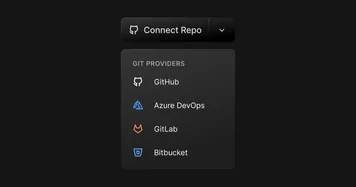
Fusion now supports all major git providers
Fusion now supports connecting code from more places: GitHub, GitLab, and Bitbucket. Fusion for Enterprise also supports Azure DevOps, self-hosted GitHub and self-hosted GitLab.
Fusion now supports connecting code from more places: GitHub, GitLab, and Bitbucket. Fusion for Enterprise also supports Azure DevOps, self-hosted GitHub and self-hosted GitLab.
Apply common settings to your connected repos to get started faster. Choose between popular frameworks, set up multiple presets, or make your own.
Start a project off with the perfect settings. Use context from a connected repo or a project made in Fusion. Set a default Starter Template to be used any time you prompt. Add custom advanced settings, reorder your favorite templates, and more.
Visually resize the gap inside selected elements by clicking and dragging.
Switch to the Modern UI in the Visual Editor for a better visual editing experience. Get a cleaner view of your design, intuitive alignment tools, redesigned panels, and a streamlined preview experience.
Quickly convert a live webpage into editable Figma layers. Type the URL of a webpage that you'd like to convert, or use the Builder.io Chrome Extension to copy a screenshot of a page and paste it into Figma. Learn more
Use the Builder plugin to generate new designs in Figma. Builder's AI uses your design tokens and any selected frames to create new on-brand interactive content. Chat to iterate your design. Import the finished design to Figma or export the interactive design to Builder. Learn more